The Information system Teacher [course selection] (Examination) Edit examination dates
Choose the courses for which you want to share an examination date, e.g. course X and course Y. Then select the option "A new examination date" and set the individual parameters. If you want to share the capacity limit of the examination date, fill in the "Shared capacity" field. The limit set will then be the same for both courses.
If you already have an examination date for one course and you want to share it with another course, add the second course to your selection and click "edit" next to the selected examination date. You will then see an option at the top of the page to add the selected course to this examination date. Check this option and the course will automatically be added to this examination date edit settings, so you will be able to set capacity limit etc.
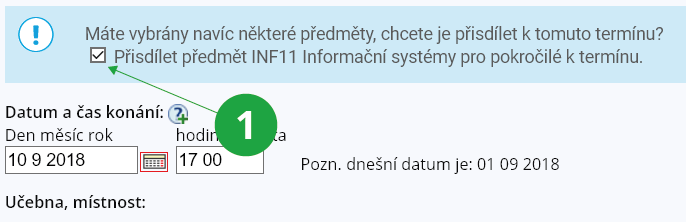
1 Option to add another course to the examination date.
However, we do not recommend using the application due to its complexity.
PozorIf another teacher has created a shared examination date that includes courses for which you are not eligible, you may not manipulate that examination date. You may, however, register and de-register students of your course to that examination date.