Permission/Exception Applications
During the course enrollment period (not during the course registration period), a student can click to request an exception, i.e. explicit permission to enter the course, from the teacher for problem courses (courses registered in red). The application prompts the student to send an email explaining why they should be admitted to the course even if they do not meet the requirements. The email is sent to the teacher, the course guarantor or the contact person, depending on who is set to be responsible for handling exceptions in the basic course-related data. The substantiation is also displayed directly in the application for each request. Exceptions can be granted or denied in
The Information system Teacher [chosen course] (Students) Registration: grant permission
The student can withdraw the pending application again – the application will send an email to the teachers. Granting an exception changes the registration to problem-free (registration conditions are not further examined).
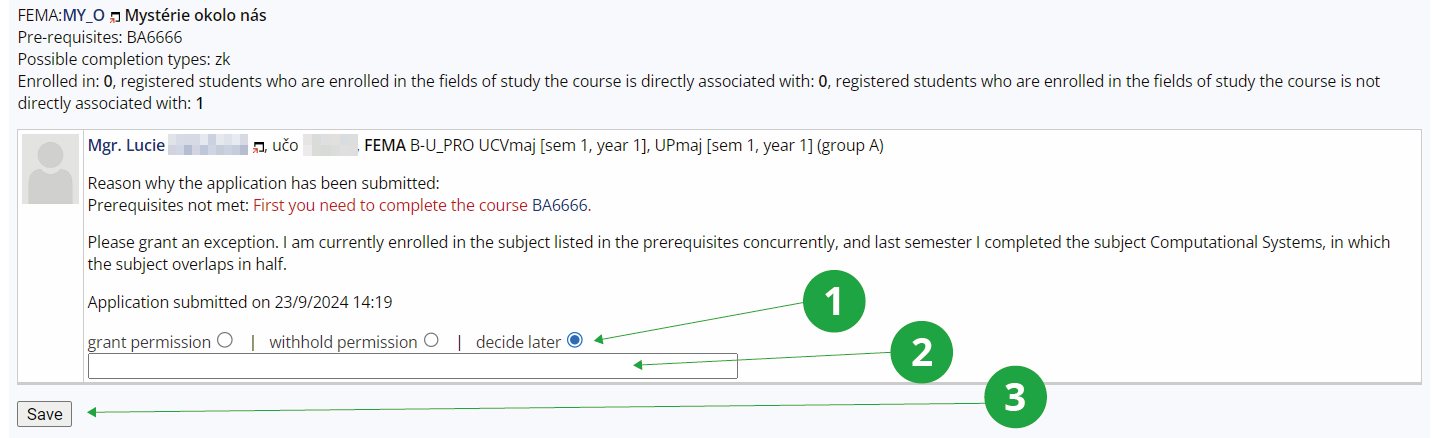
1 Not decided yet.

2 The reason for the decision on the request.

3 Save the request.

The special pre-requisite "souhlas" (consent) can be used to enforce the granting of exceptions. Registration for a course with this pre-requisite is always problematic (red) and students must apply for an exemption.

In some cases, a request for an exemption cannot be made because the teacher is not allowed to grant it. For example, if a student has already successfully completed a course at MU, he/she cannot re-enroll (except for courses where this is explicitly allowed in the Course Catalogue, e.g. PE). Only the Study Department can enroll a student in such a course.