The Term Calendar delineates registration period, course enrollment period, and period of enrollment changes. During these periods, students are allowed to select (register for)
the courses they want to enroll in as well as cancel their registration.
The student selects the courses he/she wants to register for either by looking them up using their codes or by
picking them out from a registration template. He/she can register for any course offered at the University in the given term.
The start and end dates of registration period, which are specified in the Term Calendar, differ from faculty to faculty.
If the student meets the conditions described in the Course Catalogue, the registration of a specific course is problem-free (white), otherwise it is problematic (red).
During the period of enrollment and enrollment changes, problem-free courses are confirmed each night and during each enrollment change (the difference between the period of enrollment and enrollment changes is only didactic – changes usually take place in the first two weeks of the semester). By enrolling, the student acquires the right and obligation to study the course.
The system only enrolls (confirms) courses for active studies. A student can register even if he/she has interrupted studies. The Study Department can register and enroll courses in any study regardless of its status.
Only courses from periods that fall within the same university period as the period in which the student is registering/enrolling can be selected (registered/enrolled).
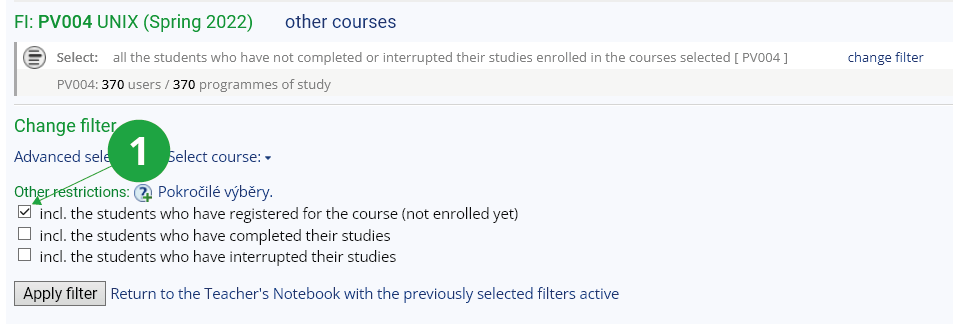
Until students are enrolled, you will not see them in the Teacher's Notebook. Select "change filter" (at the top after the course name) and "incl. the students who have registered for the course (not enrolled yet).
1 Extending the list to registered students
The Information system Teacher [chosen course] (Course Catalogue) Term Calendar
The Information system Teacher [chosen course] (Course Catalogue) Browse templates