The Information System Student [course] Homework Vaults
A list of all the open Homework Vaults in the semester:
The Information System Student Teaching Study
materials Homework Vaults you can access
Select the folder where you want to paste the file. To go up one level, click the icon  next to the folder name.

1 Menu for adding a file or a folder.
2 The student can upload an individual file using this option.
 .
If your assignment spans several files, create a new folder using
(
.
If your assignment spans several files, create a new folder using
( ).
Your file
or newly created folder should bear your name (it is not possible to
upload several files of the same name, though). After uploading the
file(s), you can re-write it (them) with a newer one(s) or delete it
(them) any time you see fit.
As regards the default access rights set for your files and folders, you
need not change these. The access rights of the Homework Vault, or rather
the folder into which students are requested to upload their assignments,
may be pre-set so that the assignment uploaded can only be read by the
student himself/herself (and his/her teacher) or by him/her, the teacher
and other students. To find out which of the two options has been chosen,
see the folder description.
).
Your file
or newly created folder should bear your name (it is not possible to
upload several files of the same name, though). After uploading the
file(s), you can re-write it (them) with a newer one(s) or delete it
(them) any time you see fit.
As regards the default access rights set for your files and folders, you
need not change these. The access rights of the Homework Vault, or rather
the folder into which students are requested to upload their assignments,
may be pre-set so that the assignment uploaded can only be read by the
student himself/herself (and his/her teacher) or by him/her, the teacher
and other students. To find out which of the two options has been chosen,
see the folder description.
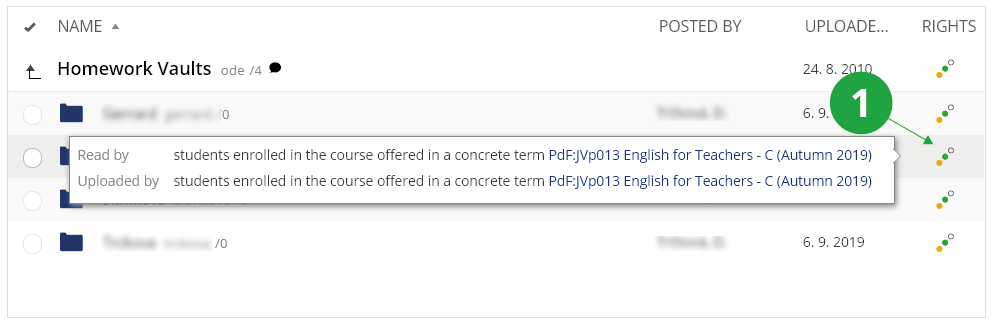
1 Access rights for the files and folders.