In the ROPOT description, just chose "save/yes" in the "Saving students' scores to a notebook" section in combination with the default score setting. IS AMBIS will automatically create a notebook where the number of points awarded will be saved. Only points are transferred, not, for example, free-form answers.
The "yes" option is further divided into the following options:
- "Save only the score of the last ROPOT session (last test)": this option is mainly used when setting "Yes, they should, but it is always the same form (same questions) that should be offered to them". However, you can also use this option if you are repeatedly setting up new tests, if only the most recent result is important for you and for the students.
- "yes, only the best result (of all the ROPOT sessions)": this option is most often used in combination with "Passed/failed evaluation". The student launches the ROPOT application repeatedly in order to achieve a certain number of points.
- "yes, only the worst result (of all the ROPOT sessions)": used when you want the student to answer only once but have the option to launch the ROPOT application a second time, e.g. in case of a failure. It cannot be used in combination with the "Passed/failed evaluation" option.
- "yes, the results last submitted of all the sessions": only makes sense if you intend to allow students to repeatedly launch new, blank tests (see below). If they take the test once and then just correct the answers (i.e. "update the same form"), the score is always overwritten by the last result.
- "yes, all the results submitted of all the sessions": used in cases where the student passes the ROPOT repeatedly and it is desirable to record the results of all answers concerning one ROPOT. For example, you can keep track of whether the student is continuously improving or deteriorating while completing the test.
- "Save only the score of the last ROPOT session (last test) and the scores gained for individual sets": use this option in exceptional situations where you need to differentiate the points earned from each question set.
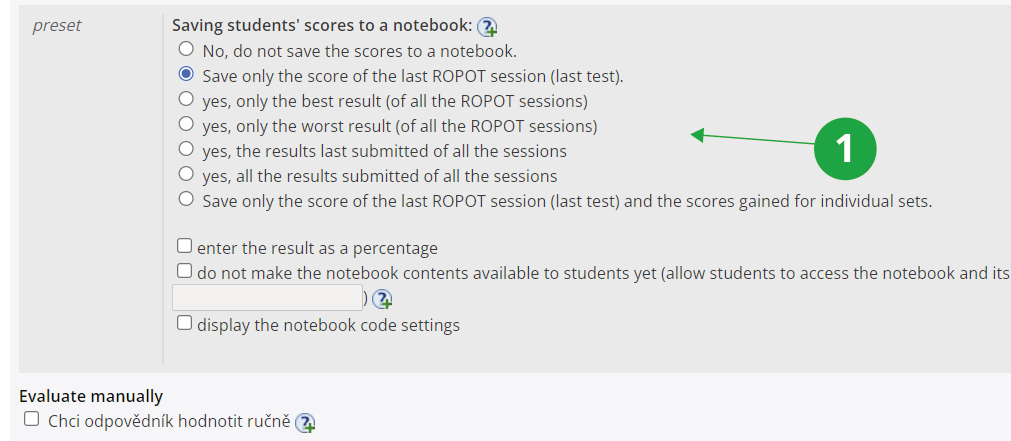
1 Preview the options for saving results to notebook.
The Information system Teacher [course selection] Work with ROPOT [selected ROPOT] responses provided [selected student] End session in progress
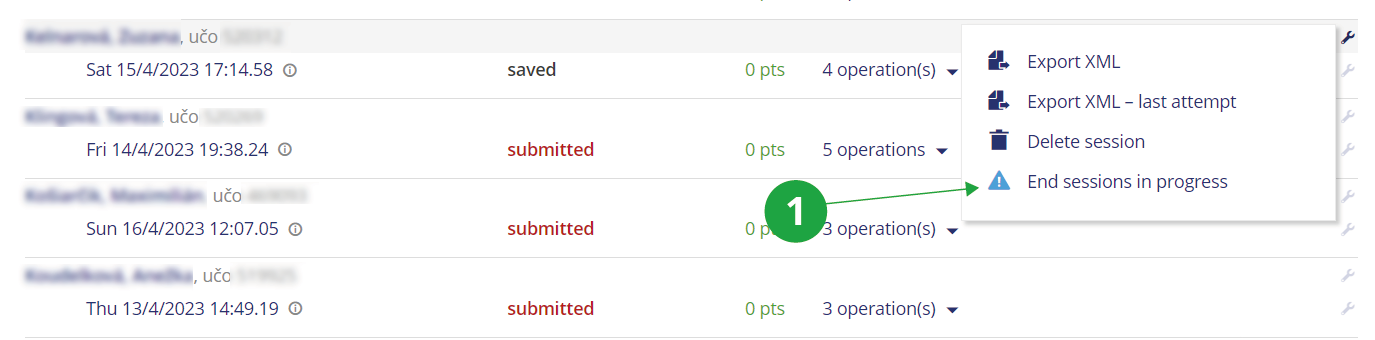
1 For the selected student, you can view the operations via the assembly key icon and select "End session in progress" among them.